

Everyone needs a reminder on how to stay secure – it’s easy to feel safe in our own homes but little things can sneak in and make a difference to how safe we are online.
The infrastructure, services and connectivity Carnival UK provide are secure and constantly updated – you may not notice the protection we have in place as it intentionally happens in the background. We use measures such as, firewalls, anti-virus and wrapping security around emails and internet browsing to keep our data safe.
That’s just a fraction of what we do – but how can you help protect our business?
- By always using your Carnival UK issued work devices and avoid using your own kit for work tasks as these may not have the same protections we work so hard to keep in place.
- Some of the most common threats include opening links on suspicious emails or downloading software from unapproved sources. Always check with the service desk (023 8065 6000) or information.security@carnivalukgroup.com if you’re not sure.
- You can also help by keeping your devices up to date. Reboot your machine regularly and don’t postpone that irritating “system update” as it may have critical security updates.
Staying safe and connected with Zoom
The best face-to-face channel we have in place to stay connected is Zoom, which is protected by our security and the highest standard of industry best practice. We’d always recommend scheduling a meeting by using the schedule function on the Zoom web home page and ensuring the generate ID option is selected.
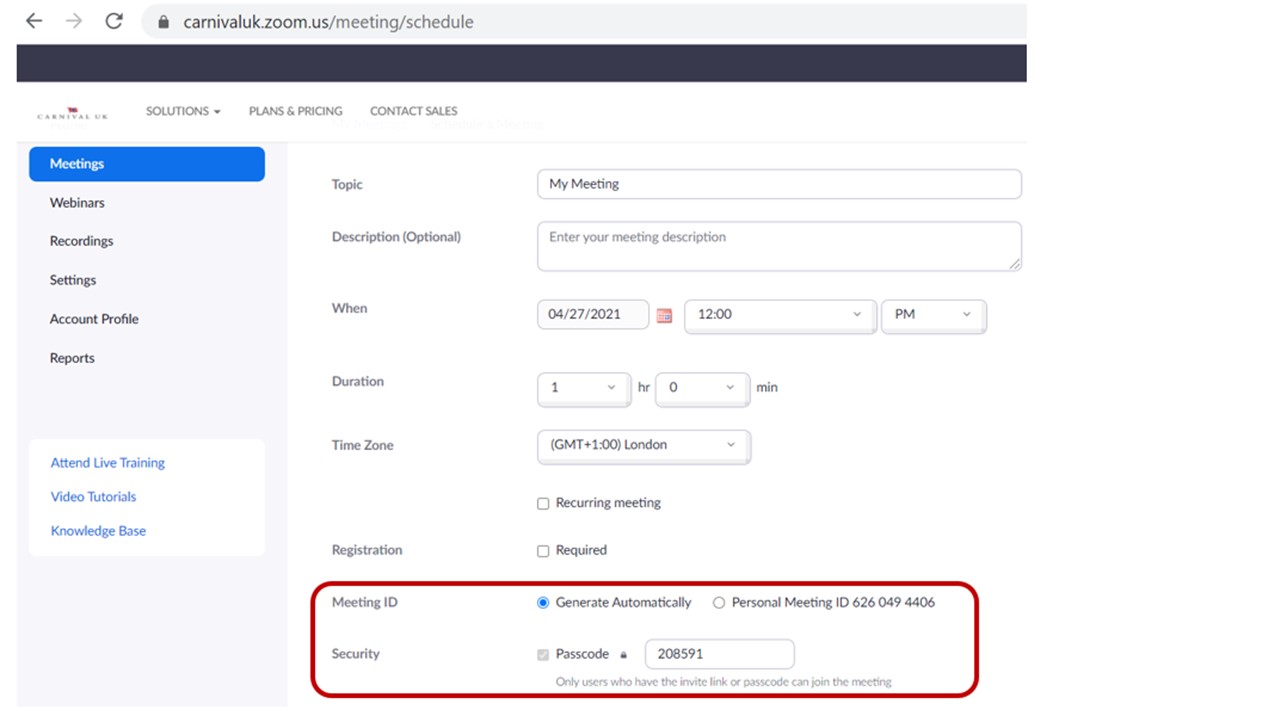
This ensures that only those with access to your Zoom meeting room can step inside to join your meetings. Waiting rooms are an added security benefit as you can now control who you let into your meetings – if you don’t recognise the attendee as someone you invited, you can decline their entry to the meeting.
To find out more about Zoom, including training guides and videos please see the Zoom pages of The Insider here.
Sharing information safely
Never use unauthorised services to share information with colleagues or business contacts. This includes collaboration tools, google drive and WeTransfer.
Here are the tools available for you to share information.
Box
More than 600 colleagues are already using Box which is an official file sharing system approved by Carnival UK. As they become available, Teams and SharePoint will also be approved for sharing information with other Carnival Brands.
Box enables you to upload, store and share files with other colleagues, business partners and our suppliers in a secure way. To gain access to Box all you need to do is complete a service request (find out how here) which will require approval from your VP. We all have a responsibility to keep information secure, so it’s important to adhere to the Box User Acceptance Terms. This means making sure we comply with the data classification handling guidelines (highly sensitive, confidential, internal, and public) when sharing information. (Some of you might remember these topics were covered at our Security awareness event, a reminder here.)
To find out how to use Box, including a 5 minute training video, (where you can find out what Box has to offer you) access, and the user guide please see The INSIDER.
Box Training
The next Box training session will be held on Wednesday 12 May, from 10:00-11:00 over Zoom. If you’d like to attend please email: Cuktechnology.communications@carnivalukgroup.com to secure your place, and we’ll add you to the training invite.
Department Folders
Your department folders are accessible from this pathway: \\carnivaluk.com\Depts\
These folders have limited access and you’ll only be able to access the folders which you have been given permission to access. They’re secured in that only those with access can view them.
If you require access to a folder you’ll need to contact the folder owner and then request a service request for access. (To see how to raise a service request please see the IT Support pages for more information.)
The Common Drive
The common drive is located in your folders at this pathway: \\carnivaluk.com\Depts\Common
These folders are available for all Carnival UK users. Theses folders allow for broader access, meaning everyone can view anything you choose to store in this location.
Working that little bit more remotely…
Lockdown is starting to ease up, summer is coming and with it you’ll likely want to venture from working inside your home to perhaps the pull of a coffee shop or outside space. Here are some useful tips to keep you ‘from ship to shore always secure’…

Be mindful of the type of work you’re doing. If you’re working with sensitive or confidential information, this should not be done in a public space. Always be mindful of where you are and what you’re working on.
Always connect to Carnival UK systems via Virtual Private Network (VPN) when working remotely. This has extra security as you need to enter a password and a passcode (via an app on your phone) to log your laptop onto the Carnival UK network.
Public Wi-Fi’s aren’t necessarily secure – lacking the security controls which are implemented on our corporate network means an attacker could intercept network communications and steal information. Again, when working remotely we should always connect to Carnival UK systems via VPN. This ensures our information is protected by Carnival UK security controls.
Wi-Fi connections may not be what they appear to be – When we connect to public Wi-Fi we never really know if what we’re connecting to is legitimate. Some access points can be set up with the intention of stealing information as it passes through. Look out for things that look unusual about the networks you’re connecting to, such as two available WiFi’s with identical names.
Shoulder surfing – Always be aware that someone could steal information by looking over your shoulder and watching what you are doing. Be wary of your surroundings.
Look after your devices – A lot of people think this won’t happen to them until it happens to them… it just takes a moment’s distraction to forget to pick up that USB stick, phone or laptop. Always check you have everything with you wherever you are once you finish work.
Your IT Support Team
To help you with your IT queries we have our own IT Support Team and Support pages for all those frequently asked questions, so you can have a quick read and then be up and running. To view the IT Support pages including FAQ’s please see The Insider here.
If you have further questions or feel that you have been victim to a phishing email or security breach please call IT Support on 023 8065 6000.
Help us help you to stay ‘from ship to Shore – always secure’.