
Watch out! Official-looking fake Windows Defender pop-ups are tricking people into thinking their PC access is locked or blocked. The pop-ups include links or phone numbers promising to unlock PCs or load security software – these are scams. Don’t take the bait! Here’s more about what to look for and how to avoid being tricked:
What is scareware?
Scareware is a tactic used to manipulate victims into downloading or buying malware-infested software. Scareware attacks trick users into thinking they must buy malware disguised as real cybersecurity software.
How does this happen?
- You accidentally click on an illegitimate link on the web prompting the scareware pop-up.
- Once you see the pop-up, you believe your system is blocked and call the number provided.
- The external party on the line directs you to download a remote access tool software (like Ultraviewer).
- Once the remote software is installed, the external party has access and it becomes compromised.
How can I prevent it?
- Use trusted security software.
- Use pop-up blockers, firewalls and URL filters.
- Keep browsers and your system updated.
- If one of these pop-ups appears, close out the entire browser rather than just the pop-up notification.
- Do not provide personal or financial information to untrusted or unknown websites.
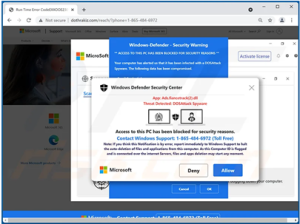
Below is an example of a pop-up you may see on your PC:
If you have questions or think your computer may be compromised, please contact IT Security.