
As a result of COVID-19 we are aware that a higher number of people are working from home.
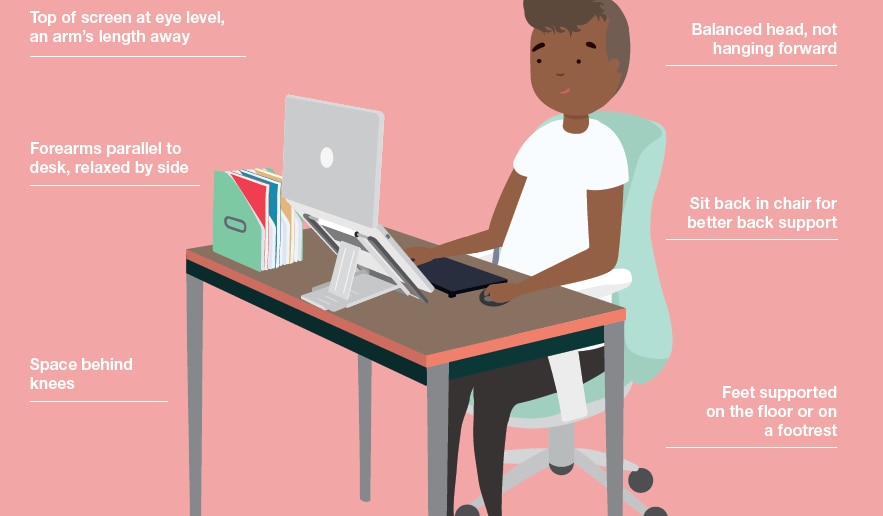
Please follow the simple guidance below to ensure you are following best practice when working from home.
 If you already have a workstation or any additional equipment at home which may aid your setup please use these items. (e.g. a desk, monitor, laptop stand, mouse or keyboard).
If you are not able to achieve the above here are some suggestions:
- Sit at a dining table, use a chair with a backrest and add cushions or pillows to achieve the correct sitting height, position and support. You are looking to maintain relaxed shoulders, bring your forearms horizontal to your keyboard and keep your back and feet supported.
- If your feet do not remain on the floor use a book or a box to support them but ensure that you are not raising your knees higher than your hips when doing so.
- If you have access to a separate mouse and keyboard please use them and raise your laptop up on a box or books to bring the screen to eye level. This will help prevent having to bend your neck or hunch your shoulders to look down at the screen.
- Stand up for short periods of time in areas of your house that might be suitable, such as a breakfast bar or on top of a chest of drawers.
- Sit directly opposite the laptop and avoid any postures that cause you to twist.
- Avoid working from the laptop directly on your lap.
- Try to keep your shoulders, elbows and wrists in a relaxed position.
- Vary tasks and move regularly to encourage blood flow and circulation throughout the body. Short, frequent breaks are more beneficial than longer, infrequent ones.
- The most important thing is not to remain static for too long.
If after completing your desk assessment you are still not content with the work set up you have at home, please contact your Leadership Team with the details of your request and upon approval, they will contact Karine Tomlin for assistance.